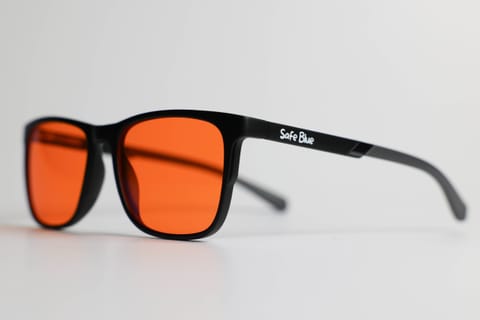
PC Gaming Glasses: Orange Lenses for Late-Night Sessions
Gaming glasses with an orange lens: what really changes for HDR, contrast and in-game colour, and when a lighter lens makes more sense. An honest guide.
· 15 min read
It is 11:40pm, your third ranked game on the trot. The 27-inch monitor is firing HDR highlights inches from your face, the room is dark because “you can see better that way”, and when you finally close the lobby your eyes are stinging and your brain is still running at 144Hz. If you recognise that scene, you have probably landed here searching for “PC gaming glasses” — and you deserve a more honest answer than the usual banner shouting “GAMING GLASSES PRO”.
This guide is about what an orange, high-filtration lens actually does in front of a gaming screen: how much blue light it cuts (numbers, not adjectives), how it changes in-game colour, why input lag is exactly zero, and — above all — when an orange lens is not the right call. Yes, there are gaming scenarios where a lighter lens, or no lens, serves you better. We will tell you which ones straight away, no waffling.
One honest caveat first. The science on filtering glasses and digital eye strain is genuinely contested, and we will cite the most serious reviews on the subject. What physics says with certainty is how much blue light reaches your eyes with and without the lens. From there, it is up to you to decide whether the trade-off makes sense for the way you play.
Gaming screens: why they get demanding after dark
A modern gaming monitor is not an office monitor. It is engineered to do the exact opposite of what you need at 11pm: high brightness, aggressive contrast, saturated colour, HDR peaks that on some panels comfortably exceed anything a productivity display will throw at you. Add a refresh rate of 144 to 360Hz and a viewing distance of 50 to 70cm, and you have an intense light source aimed straight at your face for hours.
Three factors make late-night gaming particularly taxing for visual comfort:
1. The contrast with the room. Plenty of gamers play in the dark, or near enough, for immersion or to cut reflections off the panel. The trouble is that the mismatch between a very bright screen and a dark room forces the pupil into a constant compromise. The American Academy of Ophthalmology, writing about screens and eye strain, recommends balancing screen brightness against the brightness of the room — the opposite of the classic “bat cave” setup.
2. HDR. High Dynamic Range looks spectacular in Cyberpunk or Alan Wake 2, but it means localised brightness peaks (an explosion, a neon sign, sunlight cutting across the frame) that arrive without warning. By day the visual system handles them with no bother; late at night, with the pupil dilated by the gloom, every peak feels more intrusive.
3. Blinking. When you are locked in, you blink far less than usual — a behaviour the AAO documents for any high-attention screen task. Fewer blinks mean the tear film spreads less evenly, hence the classic dry, “gritty” feeling at the end of a session. No pair of glasses on earth fixes this point: it is a matter of breaks and habits, not lenses.
On top of all this sits the timing factor. Screens emit a meaningful share of light in the blue band (430 to 480nm), the part of the spectrum the circadian system is most sensitive to. Harvard’s coverage of evening light exposure notes that the blue component shifts circadian rhythms and suppresses melatonin release more than other wavelengths. Translated for the gamer: three hours of ranked until midnight is not the ideal way to prepare your body for sleep. If you want the mechanism in full, we have a whole piece on blue light and sleep.
What an orange lens actually does (with the numbers)
Let us put the marketing aside and look at the physics. A high-filtration orange lens like the one in SAFEBLUE Classic has these measurable specs:
- 99% of light blocked between 400 and 500nm — the blue band proper;
- 85% blocked between 500 and 530nm — the blue-green transition zone that clear “computer” lenses leave almost entirely intact;
- 65% visible-light transmission — the lens dims the overall image slightly;
- a 530nm cutoff — below that threshold very little gets through, above it almost everything does.
That is what the lens does: it filters a precise slice of the spectrum. Full stop. It is not software, it does not touch the video signal, it does not “optimise” anything.
Two practical consequences follow for gaming:
Input lag: zero, by definition. A lens is tinted organic glass: light passes through it at the speed of light, with no processing, no pipeline. Any comparison with software solutions (Windows Night Light, f.lux, the monitor’s “low blue light” mode) starts here: those act on the signal or the panel, the glasses act afterwards, on the light already emitted. Neither approach adds perceptible latency in practice, but with glasses the question simply does not arise — and as a bonus they also work on consoles, an OLED telly and your phone while you wait in the queue.
The screen stays as-is for everyone else. If you game in the living room or you stream, switching on an orange software filter warms the tone for anyone watching the screen (and it ends up in the recording if you get your OBS config wrong). Glasses filter only for the person wearing them. We compared the two approaches point by point in night mode vs glasses.
And what about digital eye strain? Here honesty is required: the 2023 Cochrane review on blue-light filtering lenses found no evidence that clear filtering lenses help with short-term eye strain, and the AAO does not recommend filtering glasses as a fix for screen discomfort, attributing it mostly to reduced blinking. It has to be said, though, that those studies almost exclusively concern light, low-filtration clear lenses (10 to 20%), not orange lenses with near-total blocking like these, on which research is still thin. People who buy an orange lens mostly do so for two concrete reasons: near-total filtering of the blue band in the evening hours, and a warmer, less glaring image that many simply find more comfortable in the dark. These are legitimate usage preferences, not medical promises — and indeed a lens like this is not a medical device.
In-game colour: what to expect
The million-point question: how does a game look through an orange lens? Short answer: everything shifts warm, as if you had applied a tungsten filter. Whites become ivory, blue skies lean grey-green, blue UI elements go flat. After ten minutes or so the brain compensates a fair bit (chromatic adaptation: the same reason you stop noticing the yellow cast of warm bulbs), but it does not compensate for everything.
Concretely, by genre:
- Narrative single-player and RPGs (Baldur’s Gate 3, Elden Ring, The Witcher): the experience stays thoroughly enjoyable. These games often run a warm or desaturated palette already; the lens takes a little “punch” out of cold, night-time scenes, but nothing that breaks immersion.
- Competitive FPS (CS2, Valorant): here the story changes, and we cover it in the next section. Silhouette visibility stays good — luminance contrast does not collapse dramatically — but games that encode information in colour (enemy outlines, abilities, smokes) are perceived differently.
- MOBAs and strategy (League of Legends, Dota 2): coloured abilities stay distinguishable, but if you are used to reading a teamfight “by colour” you will need a few days to recalibrate.
- Horror and dark games: paradoxically among the best with an orange lens — dark scenes turn slightly softer and bright jump-scares feel less aggressive.
There is also a pleasant side effect many users report: with the orange lens, the urge to crank up monitor brightness fades, because the image looks less glaring at the same nit level. If you want to understand the look through the lens before buying, read do orange lenses tint everything? where we show concrete examples.
One thing that does not change: sharpness. The lens is optically neutral as far as focus goes — no distortion, no loss of detail. The colour shifts, the definition does not.
When an orange lens is NOT the right call
Promised at the top, delivered here: there are gaming scenarios where we would steer you away from a high-filtration orange lens. Here they are, no discounts.
1. Colour-critical competitive play. If you play at a serious level in titles where colour is tactical information — reading a molotov smoke off a reflection, telling a purple enemy ability from a blue one in a split second, recognising the red/green outlines in Dota — every colour shift is one more variable you do not want. Pros calibrate their monitors obsessively and train on that exact rendering: changing it mid-season makes no sense. In those cases, if you still want a filter for evening scrims, a near-clear light lens makes more sense, accepting far less filtration. You will find the full comparison in orange vs clear lens.
2. “Showcase” HDR sessions. If you have spent serious money on a 4K OLED and tonight you want to enjoy Horizon in HDR with the colour rendering you paid for, take the glasses off. An orange lens and cinematic HDR pull in opposite directions: one compresses the blue band, the other uses it for its most spectacular moments. It is not a tragedy — it is a trade-off, and it should be a conscious one.
3. Content creation in parallel. If, while you game, you are editing thumbnails, managing OBS scenes against colour references or checking your webcam’s white balance for the stream, remember you are seeing everything through a warm filter. Make your colour decisions with the glasses off.
4. Daytime gaming. By day, blue-light exposure is not the issue — in fact, per the research Harvard cites, daytime blue light supports alertness and reaction times. If you play on a Saturday afternoon with the room lit, a high-filtration orange lens is simply out of context. It is an evening tool.
If, on the other hand, your main concern is general visual tiredness and you mostly play during the day, start with the basics: regular breaks, humidification, distance from the monitor, balanced brightness. The AAO insists on these factors before any accessory, and it is right to.
A typical day: the evening gamer
Let us look at how an orange lens actually fits into the routine of someone who works by day and games at night. Take Conor, 29, an account manager by day and Diamond on Valorant by night.
9am to 6pm — Work. Eight hours of office screen. Here the orange lens is no use: daytime blue light is physiological, and Conor needs to see correct colours in his presentations. At most, a light clear lens if comfort calls for it.
6:30pm to 8:30pm — Real life. Dinner, the gym, the sofa. Phone screen here and there — this is where many people already start wearing the orange glasses, since the sun has set and every screen from now on speaks directly to the circadian system.
9pm to 11:30pm — The session. Conor sits down, fires up the PC, and here the choice gets interesting. Option one: ranked. He plays his serious games in the first couple of hours, when he is freshest, with a light lens or no glasses if he is pushing rank and wants the exact colour rendering he trains on. Option two: a chill evening — side quests, a management game, co-op with mates. Orange glasses from start to finish, monitor brightness down a couple of notches, bias light behind the monitor switched on.
11:30pm to midnight — Wind-down. A last scroll of the phone, a couple of videos, messages. Glasses still on: this is the hour when filtering the 400 to 530nm band makes the most sense, because melatonin is (or would be) rising.
The logic is simple: the orange lens is not a “gaming accessory” to wear around the clock, it is a tool to use when the context justifies it — in the evening, on long sessions, when colour fidelity is not a competitive requirement.
Bias light, brightness, breaks: the rest of the setup matters
Buying glasses and ignoring the rest of your battlestation is like buying a £150 mouse and playing at 30fps. Three near-zero-cost moves that are worth as much as any lens:
Bias light. A warm-white LED strip behind the monitor (£10 to £20) drastically cuts the brightness mismatch between screen and wall. It is the same principle used in colour-grading studios: the eye works better when the screen is not the only light source in the field of view. For evening gaming choose a warm temperature (2700 to 3000K), not RGB strips blasting blue.
Contextual brightness. The monitor set for Sunday afternoon’s tournament is wrong for midnight ranked. Build two profiles: a daytime one and an evening one with lower brightness and, if the panel allows, gamma nudged up slightly so you do not lose the shadows. Many gaming monitors have presets you can recall from a button: use them.
The rule of 20. Every 20 minutes, look at something six metres away for 20 seconds. In gaming it is easy to hook onto dead time: matchmaking queue, loading screen, end of round. The AAO recommends it for any prolonged screen activity, and it costs nothing.
The glasses sit on top of this base, not instead of it. If your battlestation is a monitor at maximum brightness in a pitch-black room, no lens will work miracles.
Frequently asked questions
Do gaming glasses with an orange lens add input lag?
No, and it is physically impossible for them to. The lens is a passive filter: light passes through it with no processing. Unlike software solutions or monitor presets, there is no processing in the chain. Input lag: absolute zero.
Can you play competitive FPS with an orange lens?
You can, and plenty of people do for casual evening sessions. For serious competitive play, though, bear in mind that in-game colours look altered: if you train on reading information from colour (abilities, outlines, smokes), the lens introduces a variable. For important ranked games, many prefer a light lens or none at all, saving the orange for afterwards.
Does an orange lens ruin HDR?
“Ruin” is too strong, but it does scale it back: cold luminous peaks (skies, neon, bluish explosions) lose part of their impact. For cinematic single-player HDR on a high-end panel, we suggest enjoying the game without a filter and putting the glasses on afterwards, in the wind-down phase.
Glasses or the monitor’s night mode?
They do similar things at different intensities. A monitor’s “low blue light” mode and Windows Night Light cut the blue component of the signal, usually mildly; an orange lens with a 530nm cutoff filters far more aggressively and works on any screen (console, telly, phone). They are not mutually exclusive: many people use software by day and glasses in the evening.
Do they work for console and OLED TV gaming too?
Yes, and it is one of the advantages over software: the lens filters light from any source, including the living-room telly where software filters are awkward or absent. For sofa gaming, where the distance is greater but the diagonals are huge, the principle is identical.
Can I wear them over my prescription glasses?
Not the classic model — it is worn on its own. If you wear prescription glasses you have two routes: prescription filtering lenses, or clip-on solutions. We cover this in the dedicated guide for people who do (or do not) need a prescription.
How much should evening gaming glasses filter?
It depends on the goal. If you are after filtering of the circadian band in the evening, you need lenses that block almost all of the 400 to 530nm range — clear ones often stop at 10 to 20% below 450nm. If instead you only want a mild daytime filter, a light lens is enough. The numbers to look for on the spec sheet: percentage blocked per band, and cutoff wavelength, not slogans.
Do the glasses get rid of tired eyes after long sessions?
Honestly: no, and be wary of anyone who promises it does. The feeling of tired eyes after hours of play depends largely on reduced blinking and prolonged focus at a fixed distance, as the American Academy of Ophthalmology documents — factors a lens does not act on. Breaks, hydration and your setup matter more. The orange lens works on a different level: filtering the blue band in the evening and making the screen less glaring in the dark.
In short
PC gaming glasses with an orange lens are an honest tool when used for what they are: a physical filter that blocks 99% of blue light between 400 and 500nm, with no input lag, on any screen, with a deliberately warm colour rendering. They are in their element on evening and night-time sessions, in single-player, on co-op nights and during the phone-in-bed wind-down before sleep. They are not the right tool for colour-critical competitive play, for showcase HDR or for daytime gaming — and we have told you that plainly, because an informed purchase is worth more than an enthusiastic review.
If your profile is the evening gamer — work by day, two or three hours of play after dinner, phone in bed — a high-filtration orange lens like SAFEBLUE Classic (€49.90, returns within 30 days if the colour rendering is not for you) is a low-risk experiment: you try it in your real conditions, on your games, and you decide. And if you first want to understand what the science says about filtering glasses in general, start with do blue light glasses work? — spoiler: the serious answer is more nuanced than a yes or a no.
Sources
This article is for information only and does not constitute medical advice. See a qualified optometrist for any vision concerns. SAFEBLUE is a visual comfort accessory, not a medical device.
Related articles
Glasses for Programmers: A Guide to Visual Comfort
Glasses for programmers with an orange lens: dark mode, 2-3 monitors, late code reviews. Setting up your desk, the real limits, and when you don't need them.
Glasses for Remote Work: Visual Comfort Working from Home
Remote-work glasses with an orange lens: the home desk, back-to-back calls, evenings with no boundary. Visual ergonomics and where the filter fits at night.
Orange vs Clear Lens: The Real Differences
Transmission spectra, blocking percentages and colour rendering: the technical comparison between orange and clear lenses, to work out which suits you.
Night Mode vs Glasses: What Actually Filters?
Night Shift, Night Light and f.lux shift the white balance; glasses filter the whole field of vision. Measurements, limits and how to combine them.