Glasses for Remote Work: Visual Comfort Working from Home
Remote-work glasses with an orange lens: the home desk, back-to-back calls, evenings with no boundary. Visual ergonomics and where the filter fits at night.
· 16 min read
Remote work changed the visual day of millions of people more than any new monitor ever did. In the office, without noticing, your eyes changed target constantly: the colleague at the next desk, the meeting room, the walk to the coffee machine, the commute itself. From home, all of that has compressed into a rectangle 60 centimetres from your nose: meetings became calls, chats became Slack, even the coffee break is often taken in front of the screen. And when the day ends, it ends in a manner of speaking: the laptop stays on the table, the notifications stay on, and the “one last email” at 10pm is now a national institution.
If you are searching for “glasses for remote work” you have probably already noticed the symptoms of this new regime: eyes that tighten at the end of the day, a screen that bothers you in the evening, evenings that slide into work and nights that start uphill. This guide lays out the whole problem, not just the part that concerns us: first the home desk (which is almost always the real culprit), then the habits that cost nothing, and finally the precise point in the day where a high-filtration orange lens makes sense — which is not “always”, but later and more often than you think.
The remote worker’s visual day: more screen, fewer natural breaks
Working remotely is not simply “the office at home”. From the eyes’ point of view, it is a different and harder regime, for three concrete reasons.
The natural breaks have vanished. In the office, every movement was an involuntary visual break: getting up for a meeting, walking a colleague to the door, looking out while someone talks. Focus changed distance dozens of times a day with no discipline required. From home, between a 9:30am call and a 10am one there are 30 minutes of documents, and the focusing distance stays nailed at 50 to 70cm from 9 to 6. The American Academy of Ophthalmology pinpoints exactly here the main causes of screen discomfort: prolonged fixed distance, blinking that collapses from around 15 to 5 to 7 times a minute, a mismatch between screen and room brightness. The set of these complaints even has a name in the literature, Computer Vision Syndrome, but the practical point is one: none of these factors depend on blue light, and none are solved by a lens.
Calls are visual work dressed up as conversation. A video call keeps the eyes fixed on compressed faces and on your own thumbnail, at the same distance and with less eye movement than a document. Eight calls a day are eight hours of screen, even if on the calendar they look like “meetings”.
The screen has become the after-hours too. The laptop closed at 6pm reopens at 9:30pm on the sofa; in between, dinner with the phone next to the plate. The difference between day and evening — which to the circadian system is everything — has dissolved along with the home-office commute.
If at the end of the day you recognise burning, dryness, vision that blurs on the text or discomfort in bright light, you are in the most common picture of remote work: in the guide to the signs of digital eye strain you will find the typical signals and when it is instead time to see an optometrist.
The home desk: the mistakes the office solved for you
The office, with all its faults, was designed by someone whose job was to design it: desks at the right height, external monitors, lighting to standard. The home desk, on average, was born over a weekend in March 2020 and has not been touched since. The recurring mistakes, in order of frequency:
Laptop only, all day. The laptop screen is too small, too low and too close. The consequence is twofold: a bent neck and tiny text that invites you to lean in further still. The single most effective upgrade in this whole guide costs from £100 up: an external 24 to 27-inch monitor, with the top edge at eye level and at 50 to 70cm distance. As a minimal alternative: a laptop stand, external keyboard and mouse. No glasses, of any kind, compete with this intervention.
The window in the wrong place. Window in front: your eyes work against a backlight for hours. Window behind: reflections on the screen all day. The right position is perpendicular, with light from the side; if the room does not allow it, light blinds and screen brightness suited to the time of day.
The wrong brightness, twice a day. The screen set for the bright morning becomes a lighthouse in the evening in the same, now-dark room. Rule of thumb: a sheet of white paper next to the monitor should look as bright as a white page on screen. In the evening, in a home environment, 80 to 120 nits is plenty to read comfortably.
Evening light from the living room, not the office. Working at 9pm with the only light being the ceiling fitting behind you (reflections) or, worse, in total darkness with the screen as the only source, is the most tiring combination there is. An indirect warm lamp from the side, or an LED strip behind the monitor, rebalances the contrast between screen and room for under £25.
Dry air. Radiators in winter and air conditioning in summer lower the humidity, and with blinking already halved, dry eyes are served. A humidifier, or just not pointing the airflow at your face; artificial tears, the AAO suggests, are a legitimate help when dryness makes itself felt.
The habits that cost nothing (and come before any purchase)
With the desk sorted, the habits. They are well known, they are boring, and they are more effective than any accessory — our glasses included.
The 20-20-20 rule, hooked to your calls. Every 20 minutes, 20 seconds looking six metres away (the window is fine). Working remotely, the perfect hook already exists: every time a call ends, before opening the chat, look into the distance until you have counted twenty seconds. Eight calls a day = eight visual breaks without a timer.
Audio calls standing or walking. Not every meeting needs the webcam. Audio-only ones done walking around the house or at the window are complete visual breaks masquerading as productivity.
Blink, genuinely. It sounds ridiculous to write it, but the drop in blinking in front of a screen is one of the most solid findings in the entire literature on screen work. A sticky note on the edge of the screen reading “blink” is less daft than it sounds.
The lunch break without screens. Eating in front of notifications means the eyes never disconnect from 9 to 6. Half an hour for real, away from the work desk, phone included: it is the one untouchable “meeting” of the day.
Bigger text, zero shame. Browser zoom at 110 to 125%, a larger editor font: if you catch yourself leaning towards the screen, the text is too small. Moving the screen closer to your eyes is the wrong solution to the right problem.
The work/evening boundary that remote work erased
Here we reach the part of the problem where blue light comes into play — and where the glasses stop being a gadget and start to have a logic.
On-site work had a physical switch: you left the building, and for an hour your eyes saw the street, the sky, distances. Remote work removed it. The typical result is a continuum of screens from 9 to midnight: documents, calls, dinner with the phone, a TV series, “just checking one thing” on the laptop, scrolling in bed. The problem with this continuum is not only mental: it is spectral. All those screens emit a significant blue component, and in the evening that band interacts with the circadian system in a documented way: research reported by Harvard Health measured that evening blue light suppresses melatonin for roughly twice as long as green light of the same intensity and shifts circadian rhythms by double (3 hours versus 1.5). ANSES, the French health-safety agency, recommends limiting exposure to intense blue light before bed and at night, particularly from screens — and notes that even very low levels are enough to interfere with biological rhythms.
The most honest answer to this problem is not a product: it is rebuilding the switch. A real finishing time, the laptop physically shut and put away, a ten-minute “fake commute” walk to mark the boundary, work notifications off on the phone after dinner. Anyone who manages this has already solved the most important part.
But the reality for many remote workers — and probably yours, if you have read this far — is that in the evening the screens stay: by choice (TV series, gaming, reading), by necessity (the call with the American time zone, tomorrow’s deadline), or in that grey zone between the two that remote work has made normal. It is exactly in this window, from sunset to the day’s last screen, that a physical filter of the blue band makes sense. On exactly when to wear them and when not, we have a dedicated guide on timing; the summary for anyone working from home is: never by day, always after sunset if the evening is made of screens.
Where the glasses come in (and what they can actually do)
Let us first be clear about what a filtering lens does not do, because the market loves to overstate this. Clear, low-filtration “computer” lenses, sold for daytime comfort, have not passed the test of evidence: the 2023 Cochrane review, across 17 randomised studies, found no evidence of benefit for short-term eye strain compared to non-filtering lenses. And no lens, of any colour, acts on blinking, fixed focus and dry air — that is, on the main causes of daytime discomfort we saw above. For that it is an external monitor, the right light and breaks: in that order.
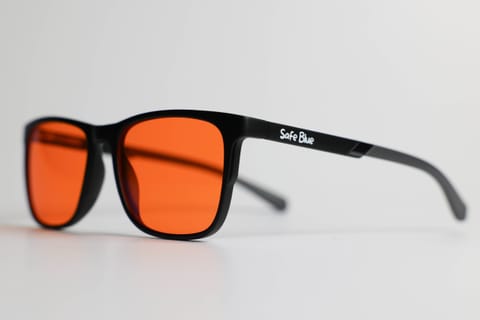
The high-filtration orange lens is a different tool, for a different problem: the evening. The numbers for SAFEBLUE Classic: 99% of the 400 to 500nm band blocked and 85% between 500 and 530nm, a 530nm cutoff, 65% visible-light transmission, €49.90 with returns within 30 days. It is a physical, measurable filter, and it has three properties that carry weight in the remote-work context:
It covers all the evening’s screens at once. The work laptop (where you may not even be able to install f.lux: IT policy), the personal phone, the telly, the tablet, the backlit e-reader. The filter sits on your eyes, not in the devices: zero configuration, zero forgotten screens. Software night modes stay useful, but they have to be enabled everywhere and they reach as far as they reach.
It makes the boundary visible. A non-trivial psychological detail: the act of putting the glasses on at 7pm is a rite of passage, the physical switch remote work took away from you. Many customers tell us the gesture matters almost as much as the filter: from that moment “it is evening”, even if the screen is the same.
It asks nothing of your employer. No ticket to IT, no new monitor to request: it is an intervention entirely yours, on the side of the chain you control.
Two honest warnings. First: the colour rendering shifts warm — for documents, chat, code and TV series it is irrelevant, but if your evening includes colour work (graphics, photo retouching) the lens has to come off during those phases. Second: do not wear it by day; daytime blue light is physiological and useful for alertness. If you need help choosing between frames, prescription and filter intensity, there is the guide on how to choose blue light glasses. And no, it is not a medical device: it is an optical filter with stated numbers.
A typical day for someone working from home
Liam, 38, a fully remote project manager, a studio flat with a work corner, a work laptop plus a 27-inch monitor bought in his second month of remote work.
8:50am — Switch-on. Blinds up, natural light from the side, monitor at medium brightness. No filtering glasses: in the morning the blue component of light plays for you, not against.
9am to 1pm — Calls and documents. Five calls. At the end of each, twenty seconds looking at the window before touching the keyboard: it is his version of 20-20-20, and it needs no timer. The 11am call, audio only, he does standing, walking around the house.
1pm to 1:45pm — Lunch without screens. Phone charging in another room. It is the house rule hardest to keep and the one most felt at the end of the day.
2pm to 6pm — Afternoon. Documents, spreadsheets, another three calls. Around 4pm the eyes tighten: a couple of conscious blinks, a drop of artificial tears, the screen pushed back ten centimetres (he had leaned in without noticing, as always).
6:15pm — The fake commute. Laptop shut and put away in the drawer — physically. Ten minutes walking outside, whatever the weather. It is his home-to-work commute in reverse, and it is the boundary the flat alone would not give him.
7:30pm — Glasses on. From here on the evening is made of screens: two episodes of a series, a bit of scrolling, sometimes a game — for gaming evenings the same scheme applies as in the PC gaming guide. Orange lens on everything: TV, phone, monitor. The monitor brightness drops 30%, the warm lamp behind the screen does the rest.
9:30pm — The managed exception. Two evenings a week there is the call with the Boston team. He does it with the glasses on: the colleagues see a dark frame and an amber lens, someone asked once, nobody remembers any more. The shared documents read perfectly: it is text, and text through the filter stays text.
11:15pm — Closing up. The last screen off, glasses set down by the bed. In the morning they stay there until sunset.
The detail to copy is not the timing of Liam’s calls: it is the pair of rituals — the 6:15pm drawer and the 7:30pm glasses — that redraws the boundary remote work had erased.
Frequently asked questions
Do I need special glasses for remote work?
Not as a first move. First come an external monitor, the window position, contextual brightness and breaks: these are the interventions that act on the main causes of daytime discomfort. The orange-lens glasses come afterwards, with a specific job: filtering the blue band on evening screens, when the working day blurs into the digital after-hours.
A clear lens to keep on all day, or an orange one for the evening?
The data say: the clear, low-filtration lens has no evidence of benefit for visual comfort (2023 Cochrane review), so as a “daytime work lens” it starts at a disadvantage. The orange lens genuinely filters, but for that very reason it is an evening tool: by day the warm cast and reduced transmission make no sense. For someone working from home the rational pattern is: no filter until sunset, high filter after.
Can I keep the orange glasses on during evening video calls?
Yes. Colleagues see an amber lens on your face — an aesthetic matter, not a functional one — and you see slides and documents perfectly legible, just warmer. If on the call you have to judge colours (a design-team presentation, a graphic review), take them off for that part.
My work laptop is locked down by IT: I can’t configure night mode. Alternatives?
It is one of the cases where the physical filter is objectively more practical than software: the lens works on any screen, including the one you cannot touch. The partial free alternative: turning brightness down by hand in the evening and sorting the ambient light, which remain good ideas even with the glasses.
I work from home and at the end of the day I get a headache: are glasses the answer?
We promise nothing on this, and be wary of anyone who does. A headache after a day at the monitor has typical causes a lens does not touch: fixed focus, posture, a screen too bright, too little water, an uncorrected refractive error. Start with your desk and breaks; if the problem is recurring, the right person is a doctor, not an e-commerce site.
In the evening I don’t work, I just watch TV series: does the filter still make sense?
Yes, because to the circadian system there is no difference between an Excel sheet and a series at 10pm: what counts is the spectrum of the light reaching the eyes, not the content. The TV is in fact often the biggest, brightest screen in the house. Same use window: from sunset to switch-off.
How long should it take to adapt to the orange lens?
The warm cast is very noticeable in the first few minutes, little after half an hour, almost nothing after a few evenings: it is normal chromatic adaptation. If after two weeks of evening use the rendering still bothers you, that is a legitimate signal the tool is not for you — the 30-day return exists for this.
What does the science say, in brief?
Three points. One: the main causes of screen discomfort are mechanical — fixed distance, reduced blinking, brightness mismatches (AAO) — and are managed with your desk and breaks. Two: for clear, low-filtration lenses there is no evidence of benefit for comfort (Cochrane 2023). Three: the effect of evening blue light on melatonin and circadian rhythms is documented (Harvard Health, ANSES), and that is where a high-intensity filter has its physical rationale. What it means for your specific evenings, you only find out by trying.
In short
Remote work took two things from your eyes that the office gave for free: the involuntary breaks and the evening boundary. The first is rebuilt with your desk (external monitor, perpendicular window, contextual brightness) and with habits hooked to your real flow — 20-20-20 at the end of a call, lunch without screens, audio meetings standing. The second is rebuilt with a closing ritual and, for the evenings that stay full of screens anyway, with a physical filter of the blue band: an orange lens that blocks 99% of the 400 to 500nm band on laptop, TV and phone at once, without asking IT for permission.
If you want to try this second piece, SAFEBLUE Classic costs €49.90 with returns within 30 days: enough time to test it over a couple of weeks of remote-worker evenings and decide with your own eyes. But do things in the right order: first the monitor at the right height and the 6pm walk, then the glasses. That is from someone who sells the glasses.
Sources
This article is for information only and does not constitute medical advice. See a qualified optometrist for any vision concerns. SAFEBLUE is a visual comfort accessory, not a medical device.
Related articles
Glasses for Programmers: A Guide to Visual Comfort
Glasses for programmers with an orange lens: dark mode, 2-3 monitors, late code reviews. Setting up your desk, the real limits, and when you don't need them.
PC Gaming Glasses: Orange Lenses for Late-Night Sessions
Gaming glasses with an orange lens: what really changes for HDR, contrast and in-game colour, and when a lighter lens makes more sense. An honest guide.
When to wear blue light glasses: a guide by time of day
Evening yes, daytime it depends, never night driving: a practical guide to when it makes sense to wear blue light glasses, with routines and examples.
Digital eye strain symptoms from screens: the guide
Digital eye strain symptoms from screens: how to recognise them, why they happen, the 20-20-20 rule and its limits, and when to see an eye doctor.