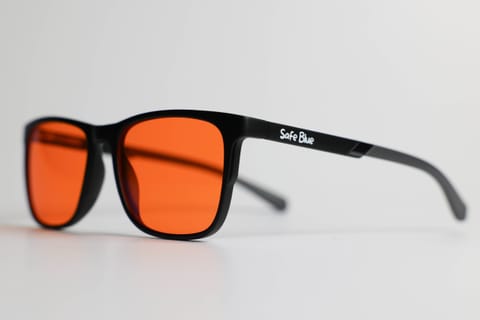
Glasses for Programmers: A Guide to Visual Comfort
Glasses for programmers with an orange lens: dark mode, 2-3 monitors, late code reviews. Setting up your desk, the real limits, and when you don't need them.
· 14 min read
If you are a developer, your visual day looks something like this: eight to ten hours across two or three monitors, an IDE in dark mode with fluorescent syntax highlighting, a terminal, Slack, a dozen documentation tabs, and — on a good day — a code review at 10pm because the deploy is tomorrow. The monitor is as much a tool of your trade as the keyboard, yet almost no dev gives their “visual chain” a tenth of the attention they lavish on their keycaps.
This guide is about glasses for programmers, but it does not start with glasses. It starts with what a dev’s day is actually made of — dark themes, text-to-background contrast, the wrong ambient light — because orange-lens glasses only make sense inside a thought-through setup, and at certain points in the day they make no sense at all. We will tell you straight away, as a brand that sells exactly these glasses: if you are working on pixel-perfect frontend at 11am, an orange lens is the wrong tool. If, on the other hand, you recognise the pattern “long evening session, eyes that tighten, then bed with the brain still firing”, read on: we will look at what the physics says, what the research says (and does not say), and how dozens of developers fit a high-filtration lens into their routine — typically from 6pm onwards, not around the clock.
Eight hours of code: what your eyes actually look at
A programmer’s job is a special case of screen work, for three measurable reasons.
First: text density. A dev does not look at images, they look at thousands of 12 to 14px glyphs for hours, often across multiple monitors with different pixel densities (the HiDPI laptop, the external 27-inch QHD, maybe an old FHD turned portrait for the logs). Every monitor switch is a micro-readjustment of focus and perceived text size. Multiply that by the hundreds of times a day you jump from VS Code to the browser to the terminal.
Second: the fixed distance. Focus stays nailed at 50 to 70cm for hours. The American Academy of Ophthalmology pinpoints exactly here — fixed distance, reduced blinking, a screen too bright relative to the room — the main causes of screen discomfort, well ahead of blue light itself. It is a point we will repeat: no lens changes the biomechanics of focusing.
Third: the timing. Software development is one of the most “evening” trades there is. Off-peak deploys, teams spread across time zones, the classic flow that arrives at 9pm when Slack finally goes quiet, side projects after dinner. And this is where the blue component of the spectrum genuinely comes into play: research reported by Harvard Health shows that evening blue-light exposure suppresses melatonin release and shifts circadian rhythms roughly twice as much as green light of the same intensity. For anyone closing the IDE at midnight, that is not a theoretical detail.
If by the end of the day you feel burning, dryness, vision that “shimmers” on the text, you are in good and numerous company: we have a whole piece on the typical signs of digital eye strain and how to tell them apart.
Dark mode and dark themes: they help, but they are not enough
Every dev has their religion: Dracula, Gruvbox, Catppuccin, One Dark, Solarized. Dark mode is now the de facto standard, and for good reasons: in a dimly lit room, a dark background cuts the total amount of light the monitor emits and reduces the “lamp in the face” effect.
But dark mode has three limits worth knowing:
1. It does not remove the blue component — it concentrates it in the wrong spots. A dark theme cuts the total light, but modern syntax highlighting is full of cold, saturated colours on a near-black background: the cyan of keywords, the blue of functions, the purple of operators. And above all, the surfaces you use constantly stay white or near-white: documentation (MDN by day is white), Stack Overflow, Google, AWS dashboards, email. Your dark-mode evening is in reality an alternation of darkness and flashbangs.
2. On small text it can hurt legibility. With even mild astigmatism, light text on a dark background tends to “halo” (the so-called halation effect): many devs who swear by dark mode squint without realising it. If that is you, try a low-contrast dark theme (dark-grey background, not pure black) or, heresy, a light theme by day with adequate ambient brightness.
3. It does not know what time it is. The theme is identical at 10am and at 11pm, while the light and circadian context is completely different. Night Light, f.lux or Gamma on Wayland warm the panel’s colours in the evening, but mildly if you want to keep things usable — and they do not act on poorly supported secondary monitors, on the telly, on the phone you check between builds. The honest comparison between software filters and glasses is in night mode vs glasses.
Intermediate conclusion: dark mode is a good ergonomic default, not a complete solution. It is level 1 of the stack.
The desk before the glasses: ambient light and bias light
If there is one thing we would want every dev to do before buying our glasses, it is to sort out their lighting. It costs less and pays off more. Three moves, in order of impact:
Bias light behind the monitors. A warm-white LED strip (2700 to 3000K, decent CRI) stuck behind the main monitor, pointed at the wall. It reduces the contrast ratio between screen and background, which is one of the first causes of discomfort in dark sessions. It is the same logic as professional video studios. Cost: £15 to £25. If you work in the evening with a dark room and the monitors on, it is the ergonomic upgrade with the best bang for buck there is.
Indirect ambient light, never behind the screen… nor behind you. A lamp reflecting off the panel creates glare; a window behind you does the same. The right configuration: diffuse light from the side or above, window perpendicular to the monitors. The AAO puts managing reflections and brightness among its first practical tips for anyone spending the day at a screen.
Monitor brightness tied to the room. Rule of thumb: a sheet of white paper next to the monitor should look as bright as a white page on screen. If the screen “glows” relative to the paper, it is too high. In the evening, turn it down: 80 to 120 nits in an evening home environment is plenty for text.
To this add the 20-20-20 rule (every 20 minutes, 20 seconds looking six metres away), which for a dev hooks naturally onto dead time: a build, the test suite, docker compose up, CI running. You already have timers built into the workflow — use them for your eyes too.
Where the glasses come in (and which lens for which dev)
With the base sorted, let us talk lenses. For a programmer there are really two options, and — honesty first — they answer different needs.
A clear or near-clear lens (10 to 30% blue filtration). Worth considering if you want a mild filter to keep on all day with no perceptible colour shift. But know what the research says: the 2023 Cochrane review, which analysed 17 randomised studies on exactly these clear lenses, found no evidence of benefit for short-term eye strain compared to non-filtering lenses. The AAO does not recommend them for this purpose either. If you buy them, buy them knowing the scientific rationale is weak; the full comparison is in orange vs clear lens.
A high-filtration orange lens. Here the story is different because the goal is different: not “filter a little all day” but filter almost everything in the evening hours, when the blue band interacts with the circadian system. The numbers for a lens like SAFEBLUE Classic: 99% blocked between 400 and 500nm, 85% between 500 and 530nm, a 530nm cutoff, 65% visible-light transmission. It is a physical, measurable filter that works on any screen in your evening — the three monitors, the laptop, the phone — without touching software settings or altering what colleagues see in pairing or screen sharing (they see the normal screen; you have the filter on your nose).
How does code feel through an orange lens? Surprisingly fine, and it is one of the reasons devs are among our most loyal customers: code is text, and text survives the colour shift very well. The Dracula theme shifts in tone but the distinction between tokens stays: the luminance contrast between the syntax-highlighting colours does not vanish, the whole scene simply warms up. After ten minutes of chromatic adaptation, most people stop noticing it. What many users do report noticing, instead, is that the screen “blasts” less on dark sessions — consistent with the physical fact that 65% of visible light and almost zero blue band reach the pupil.
Two honest usage notes: first, this is not a lens to wear at 10am — by day blue light is physiological and useful for alertness. Second, do not expect any effect on what depends on blinking and focusing: for that it is breaks and your desk, as said above. The orange lens is an evening tool with a precise job. It is not a medical device, and we do not pass it off as one.
When an orange lens is NOT the right call for a dev
A mandatory section in every one of our guides. Concrete cases where we are the ones telling you not to use it:
CSS, frontend and design systems. If you are choosing a button colour, checking the WCAG contrast of a palette, or doing a UI review alongside a designer, take the glasses off. You are literally seeing colours through a filter: every colour judgement is skewed. The same goes for anyone working on data visualisation, maps, graphic themes. (For professional designers we have written an even more drastic guide.)
Standard daytime work. Let us say it again: 9am to 6pm with good ambient light is not the use case. An orange lens worn all day, besides being useless by day, would have you arriving at the evening already habituated to the warm rendering.
Accessibility and colour vision deficiency. If you have a red-green colour deficiency and your work depends on colour distinctions (CI states, red/green diffs, coloured logs), adding a filter that recolours the whole spectrum is one more variable to weigh carefully — try it first in non-work contexts, and remember you have 30 days to return it.
Instead of sleeping. It sounds like a joke, it is not: no glasses make the “code until 2am, up at 7” routine sustainable. The evening filter makes sense inside humane hours, not as a licence to extend them.
A typical developer’s day (with and without lenses)
Take Aoife, 31, a backend developer at a scale-up, two 27-inch QHD monitors plus the laptop, working from home three days a week.
9am to 1pm — Deep work. Bright room, monitor at medium brightness, no filtering glasses (she wears her normal prescription pair). Daytime blue light is an ally here: alertness, mood, reaction times, as the literature Harvard cites notes.
1pm to 2pm — A real break. Away from screens. The phone at lunch counts as a screen, yes.
2pm to 6pm — Meetings, reviews, tickets. Screen-webcam-screen alternation. Aoife keeps the 20-20-20 rule hooked onto CI: pipeline starts, glance out of the window. Mid-afternoon her eyes feel dry: more conscious blinking, a hit of artificial tears if needed (an AAO tip, not ours).
6pm — The boundary. Here the regime changes. If the day is done, it is done. But two evenings a week there is the release, or the Rust side project that will not write itself.
6:30pm to 11pm — Evening session. Bias light on, monitor brightness down 30%, orange glasses on from the start. A code review at 10pm on a colleague’s diff? The red/green of the diff stays perfectly legible — shifted in tone, identical in function. Slack, terminal, IDE: all normal, all warmer.
11pm to 11:45pm — Closing up. Phone on the sofa, last notifications. The glasses stay on until the last screen is off. Then bed, with no horizontal scroll in the dark.
The pattern to copy is not Aoife’s hours: it is the boundary at 6pm (or whenever the sun sets for you) as a switch between “screen without a filter” and “screen with a filter”.
Frequently asked questions
Do orange-lens glasses alter syntax highlighting?
They alter its tones, not its legibility. The theme’s colours all shift warm in a consistent way, so the distinction between keywords, strings and variables stays — it is the same scene under different lighting. The vast majority of devs adapt in a few minutes. It is a different story if you have to judge colours (UI, CSS): in that case, take them off.
Dark mode or glasses?
A badly posed question: they work on different planes. Dark mode cuts the total light emitted, the glasses filter a specific band of the spectrum across every screen you look at. The typical combination for evening devs is: dark mode always, contextual brightness, orange glasses after sunset.
Can I keep them on for eight hours a day?
You can, but it is not the use they make sense for. By day, the blue component of light is physiological. The rational usage pattern for a dev is from the evening onwards: typically from 6 to 7pm until the day’s last screen.
I have three monitors: do I need different filters for each?
No, and this is exactly the strength over software solutions: the lens sits on your eyes, so it filters laptop, external monitors, phone and backlit e-reader uniformly, regardless of drivers, operating system and Night Light support on the secondary panels.
Does the orange lens work with astigmatism or prescription lenses?
The standard model has no correction. If you wear prescription glasses, the routes are prescription filtering lenses or wearing contact lenses under the filtering glasses: you will find the details in our guide for people who do (or do not) need a prescription.
What does the science say, in one line?
That for clear, low-filtration lenses the evidence of benefit for digital eye strain is absent (2023 Cochrane review, AAO position), while the effect of evening blue light on melatonin and circadian rhythms is well documented (research Harvard Health cites). High-filtration orange lenses sit on the second front: they filter almost all of the band in question, and that is a measurable physical fact. What follows from that for your sleep, honestly, you only find out by trying.
Do I need the anti-reflective coating?
Yes, on any screen glasses it is a real plus: it cuts reflections of light sources behind you off the lens surface. On SAFEBLUE lenses it is standard.
No glasses: what can I do for free this very evening?
An improvised bias light (even a warm lamp behind the monitor), brightness down, f.lux/Night Light at the most tolerable intensity, the 20-20-20 rule hooked to builds, and screens off 30 minutes before bed. If after two weeks the evenings are still heavy, then think about glasses — in the right order.
In short
For a programmer, visual comfort is a stack: at the base, the desk (ambient light, bias light, contextual brightness); above it, habits (breaks hooked to workflow dead time, blinking, time boundaries); and at the top — for anyone who works or tinkers in the evening — a high-filtration orange lens that blocks 99% of the 400 to 500nm band on every screen of the evening, dark-mode IDE included. No miracle promises: code looks perfectly fine, colours shift warm, colour fidelity is not the point. If you do colour-critical frontend, take it off during those phases; if your problem is the evening sessions and the nights with the brain idling at 100%, it is exactly the context it was made for.
SAFEBLUE Classic costs €49.90 with returns within 30 days: enough time to try it over a couple of sprints and decide with your own eyes. And if you first want the full scientific basis, start with do blue light glasses work?.
Sources
This article is for information only and does not constitute medical advice. See a qualified optometrist for any vision concerns. SAFEBLUE is a visual comfort accessory, not a medical device.
Related articles
PC Gaming Glasses: Orange Lenses for Late-Night Sessions
Gaming glasses with an orange lens: what really changes for HDR, contrast and in-game colour, and when a lighter lens makes more sense. An honest guide.
Glasses for Traders: Multi-Monitor, Candles & US Sessions
Orange-lens glasses for traders: 4-6 monitors, red/green candles still readable but altered, evening sessions on the US markets. An honest guide.
Glasses for Remote Work: Visual Comfort Working from Home
Remote-work glasses with an orange lens: the home desk, back-to-back calls, evenings with no boundary. Visual ergonomics and where the filter fits at night.
Digital eye strain symptoms from screens: the guide
Digital eye strain symptoms from screens: how to recognise them, why they happen, the 20-20-20 rule and its limits, and when to see an eye doctor.