Studying at the PC for Hours: A Method for Students
Breaks with 20-20-20, lighting, posture, library vs bedroom: how to study at the PC for hours with more visual comfort, and where glasses fit in.
· 14 min read
Exam season. You are on your fourth PDF of the day, the lecture slides have that blinding white background only professors seem to choose, and your eyes have started sending signals: blur when you glance up, heavy lids, that gritty sandpaper feeling anyone who has revised for an exam on a screen will recognise. Studying at the PC for hours is the baseline condition of the modern university student — digital notes, lecture handouts in PDF, recorded lectures, Anki decks, and then Netflix “to switch off”, all on the same screen.
The good news: most of the discomfort is not inevitable, and the most effective countermeasures are free. The honest news: no accessory — not even our glasses — replaces a method. That is why this article is built in this order: first breaks and the 20-20-20 technique, then lighting (with the library vs bedroom comparison), then posture and setup, then evening sessions, and finally, in its rightful place, filtering glasses — with an eye on the student budget, because €49.90 is not nothing when the comparison is a week’s groceries.
One necessary note first: if the discomfort is frequent or intense, or if you suspect you are not seeing clearly, the first sensible spend is an eye exam. A small uncorrected refractive error, after six hours of PDFs, makes itself felt more than any screen does — and no study method compensates for it.
Why your eyes complain after hours of PDFs
Understanding the mechanism helps you pick the right countermeasures. When you read on a screen, three things happen, documented in the visual comfort literature and summarised well by the American Academy of Ophthalmology:
- You blink less. This is the main factor: in front of a display, blinking drops sharply (in some observational studies, from around 15 to 5–7 times a minute), the tear film evaporates and that dry, burning sensation arrives.
- You hold focus locked up close for hours. The muscles that adjust focus work in continuous contraction at the same distance: it is the reason the far world stays blurry for a few seconds when you look up from the PDF.
- You fight contrast and reflections. A bright screen in a dark room, a window reflected on the display, small type on glaring backgrounds: every reflection and every jump in brightness is extra work for the pupil.
This cluster of complaints even has a name in the English-language literature — digital eye strain, or computer vision syndrome. Two important things the AAO says about it: these symptoms are temporary and there is no evidence that screens cause permanent damage; and the blue component of light is not the main culprit — the culprit is how we use screens. If you want to recognise the signals one by one, we have catalogued them in digital eye strain symptoms.
Note the practical consequence: if the problem were blue light, a filter would be enough. Since the problem is (mostly) behaviour, you need a method. Here it is.
Method before accessories: breaks and 20-20-20
The countermeasure with the best cost-benefit ratio in the whole article costs zero pounds: interrupting near fixation regularly.
The easy-to-remember formula is the 20-20-20 rule: every 20 minutes, look at something 20 feet away (about 6 metres — the window is perfect) for at least 20 seconds. It is not magic: it is giving the focusing muscles a chance to relax and the eyelids a chance to blink normally again.
The problem with 20-20-20 is that nobody remembers it, so it needs to be automated and — better still — hooked onto a study method you already use:
- Pomodoro technique, eye edition: if you study in 25-minute blocks, you already have the timer. Use the 5-minute break to stand up and look out of the window, not to open Instagram (which is… another screen 30 cm from your nose).
- Dedicated timer: any reminder app with an alert every 20–25 minutes. A discreet tone if you are in the library.
- Hook it to the content: end of a chapter in the PDF, end of a recorded lecture, end of a flashcard batch = look into the distance. Teaching units often last exactly 15–25 minutes.
And roughly every hour, a real break: on your feet, a few steps, some water. Your neck and back will thank you along with your eyes, and your memory too — spaced breaks are one of the few things that the science of studying and the science of visual comfort agree on perfectly.
Add the most underrated micro-habit: blinking on purpose when you think of it, especially when you feel the first signs of dryness. If the gritty feeling is frequent, over-the-counter artificial tears are an option to discuss with the pharmacist or optometrist.
Lighting: library vs bedroom
The same PDF, read in two different settings, produces two different days. Let us look at the student’s two classic habitats.
Library. Strengths: general lighting that is usually plentiful and even, tables built for reading, and the social factor that discourages multitasking. Weaknesses: you control nothing. If your seat has a flickering fluorescent tube or a window behind you that reflects on the screen, the only lever you have is to change seats — do it without mercy, your next four hours depend on it. Golden rule for positioning yourself: light to the side of the screen, never in front (it dazzles you), never behind (it reflects on the display). And bring a water bottle: library air conditioning dries the tear film almost as much as the screen does.
Bedroom. Here you control everything, which means you can get everything wrong. The classic mistakes: studying by screen light alone in a dark room (maximum contrast, minimum comfort), the desk lamp aimed so it creates a cone of light surrounded by darkness, the screen in front of the window. The setup that works:
- general light on (ceiling or floor lamp): the screen must not be the brightest object in the room;
- an adjustable desk lamp to the side, lighting notes and keyboard without pointing at your eyes or the screen;
- screen brightness in proportion to the room: the empirical test is to look at a sheet of white paper next to the display — if the screen “glows” much more, turn it down;
- in the evening, a warmer colour temperature: both for the bulbs (under 3000 K) and for the screen (night mode). On the why, we will get there in two sections.
Posture and setup: the geometry of the desk
Visual complaints and muscular ones travel together, and the geometry of your workstation governs both. The standard references, valid even for a hall-of-residence desk:
- Distance: screen at roughly an arm’s length (50–70 cm). Closer and you tire the focusing system; further and you are forced to crane forward.
- Height: top edge of the screen at eye level or just below, so your gaze falls slightly downward — the position in which the eye is naturally most relaxed and most covered by the lids.
- The laptop problem: respecting both rules with a laptop is geometrically impossible (if the screen is at the right height, the keyboard is not). The solutions, in budget order: a stack of textbooks under the laptop plus a cheap external keyboard and mouse (€15–25), a folding stand (€15–30), or a used external monitor (often €50–80 at university marketplaces) that is life-changing for anyone studying side-by-side PDFs.
- Type size and zoom: if you notice yourself leaning towards the screen to read, do not lean in — zoom in. Zoom at 125–150% on dense PDFs is the norm, not the exception. Light theme or dark theme? Individual readability wins: what matters is adequate contrast and a brightness consistent with the room.
This applies even if you already wear prescription glasses: hours of close study are exactly the scenario in which an out-of-date correction costs you dearly. If it has been more than two years since your last check-up, book one before the next session. And if you are wondering how correction and filters coexist, we cover it in blue light glasses with or without prescription.
Evening study, exams and sleep
We come to the most delicate moment of the typical day: evening sessions, which under exam pressure become night-time ones. Here the topic changes: no longer just comfort, but the circadian clock.
Evening light — in particular the blue component, the band between 400 and 500 nm — signals to the brain that it is still daytime and delays melatonin production. Harvard Health reports that, at equal intensity, blue light suppressed melatonin for about twice as long as green light in the experiments cited. For a student the translation is concrete: closing the laptop at midnight after four hours of full-brightness slides and expecting to fall asleep in ten minutes is a bet lost from the start — and sleep is exactly the moment when what you have studied gets consolidated.
The countermeasures, in order of importance:
- Schedule heavy revision in daytime hours and leave the light tasks for the evening. (Yes, it is a study-method tip disguised as a visual tip. It works for both.)
- Last hour before bed without screens, when the exam allows: revision on paper, hand-drawn diagrams, physical flashcards.
- A “tamed” evening: warm, low lights in the room, night mode on laptop and phone, brightness down.
- If the evening at the PC is unavoidable, this is where the orange lens comes in — and it is the subject of the next section. The complete picture on light and the internal clock is in blue light and sleep.
Where glasses fit in (honestly)
Let us put the cards on the table, as always. What you cannot expect from a filtering lens: the 2023 Cochrane review (17 randomised trials) found no clear difference between filtering lenses and standard lenses for short-term visual fatigue. So no, glasses are not the answer to tired eyes from PDFs: that answer stays in the earlier sections — breaks, light, geometry.
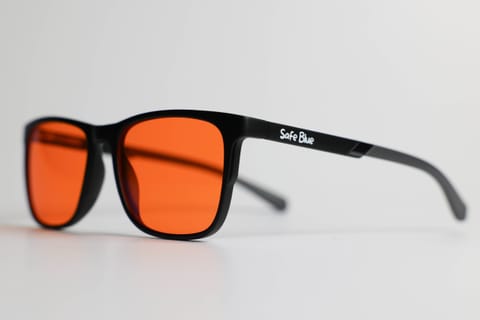
What you can expect, instead, from a real orange lens is a physical fact. The SAFEBLUE Classic blocks 99% of light between 400 and 500 nm and 85% between 500 and 530 nm, with a sharp cutoff at 530 nm and 65% visible transmission: wearing it in the evening hours means the blue band of the screen (and of the ceiling light) simply no longer reaches your eyes in any meaningful amount. It is the use consistent with the circadian physiology described above, and the reason we recommend it for evening sessions, not for the eight hours in the library — by day, light is right to do its job. The full guide to when to wear them is in when to wear blue light glasses.
Two practical student warnings: with the orange lens colours change — if you study histology on digital slides, colour-coded charts or subjects where colour carries information, keep it for text revision; and never use it to ride a moped home at night (65% transmission: night driving needs all the light available).
Student budget: what to buy and in what order
Let us talk money, which for a student is a real variable. Here is our spending hierarchy for screen comfort — yes, with our own glasses deliberately not at the top:
- Free: the 20-20-20 rule with a timer, conscious blinking, general light on, screen at arm’s length, zoom on PDFs, heavy revision by day. On its own this covers most of the problem.
- €0–30: a laptop stand (or a stack of books) plus an external keyboard and mouse; a warm bulb for the desk lamp; artificial tears if the optometrist or pharmacist suggests them.
- €50–80: a used external monitor. For anyone studying PDFs and slides side by side, probably the upgrade with the most perceived impact on the whole list.
- €49.90: orange-lens glasses for the evenings — useful if (and only if) your evening sessions and pre-sleep habits are a real problem. With 30 days to return them you can try them over a full exam cycle: if they do not convince you, you send them back and have spent nothing.
- Variable but a priority over everything if you do not see clearly: the eye exam. Before any accessory.
On how to judge prices in the category (and what to be wary of below €20), we have written a dedicated guide: how much blue light glasses cost.
Frequently asked questions
How many hours at the PC can you do without problems?
There is no magic number: breaks count more than the total. With the 20-20-20 rule, real breaks every hour and a well-lit workstation, even long days stay manageable for most people. If the discomfort appears early and often anyway, the signal to listen to is “eye exam”, not “grit your teeth”.
Is the screen ruining my sight?
According to the American Academy of Ophthalmology there is no evidence that screens cause permanent damage: the complaints of digital eye strain are temporary. That does not make them pleasant — and it is the reason method and workstation matter — but it removes the biggest fear.
Is it better to study on paper?
For visual comfort paper has real advantages (no backlight, normal blinking), but the point is not the medium: it is the distance, the light and how long you hold fixation. A book 20 cm from your nose for four hours is no better than a monitor at 60 cm with regular breaks. Use the medium that suits the studying and apply the same rules to both.
Dark theme or light theme for PDFs?
It depends on the room and on you. In a well-lit room, a light theme with adequate brightness is generally more readable; a dark theme makes most sense in dim settings, to reduce the jump in brightness. The rule that does not change: the screen should be neither a beacon in the dark nor a dead panel under the sun.
Will blue light glasses help me read PDFs better?
No, and anyone who promises that is overstating it: the 2023 Cochrane review found no clear difference in short-term visual fatigue compared with standard lenses. Their sensible role is a different one: screening the blue band in the evening hours, when the body should be getting ready for sleep.
I study late under exam pressure: what concrete things can I do?
In order: move the heaviest material to daytime hours; in the last hour before bed switch to paper; lower and warm the room lights; turn on night mode on your devices; and if the evening at the PC is long and unavoidable, consider an orange lens for those hours. None of this recovers a sleepless night: sleep remains memory’s best ally.
I already wear prescription glasses: what do I do about the filter?
The options are prescription lenses with a filter (to assess with your optician) or clip-on solutions. We cover it in detail in the article on blue light glasses with and without correction. In any case, the up-to-date correction comes before the filter: it does the bulk of the work during study hours.
€49.90 is a lot for a student budget: is it worth it?
It depends where you are in the spending hierarchy. If you have not yet sorted out breaks, light and workstation, start there: it costs less and delivers more. If your real pain point is the evenings in front of the screen, the 30-day return exists to answer the question better than any article can: you try, and if they are not for you, you send them back.
In short
Studying at the PC for hours without paying for it is mostly a matter of method: 20-20-20 breaks hooked onto your study technique, ambient light always on and consistent with the screen, the workstation geometry sorted (especially with a laptop), heavy revision by day and tamed evenings. Orange-lens glasses enter the scene only in the day’s final chapter — the hours before bed — with one precise physical job: screening the blue band when the body should be starting to wind down. If that is your pain point, the SAFEBLUE Classic costs €49.90 and has a 30-day return: the length of one exam session to work out whether it is a purchase worth repeating. For everything else, the method is free — and it works straight away.
Sources
This article is for information only and does not constitute medical advice. See a qualified optometrist for any vision concerns. SAFEBLUE is a visual comfort accessory, not a medical device.
Related articles
When to wear blue light glasses: a guide by time of day
Evening yes, daytime it depends, never night driving: a practical guide to when it makes sense to wear blue light glasses, with routines and examples.
Digital eye strain symptoms from screens: the guide
Digital eye strain symptoms from screens: how to recognise them, why they happen, the 20-20-20 rule and its limits, and when to see an eye doctor.
Blue Light Glasses Price: Real Market Tiers in 2026
What blue light glasses actually cost: €10-20 on marketplaces, €30-60 mid-range, €70-100+ premium. What you really pay for, and the low-cost traps.
Blue light and sleep: melatonin, circadian rhythm, data
Blue light and sleep: what studies say about melatonin and the circadian rhythm, the effect of evening light and why glasses are not a promise of sleep.